A useful planner gives your day a shape without pretending that every minute will go exactly as expected. Start with the appointments you cannot move, choose the few tasks that matter most, and leave enough space for ordinary interruptions. This collection offers 15 editable daily task planner and schedule templates in Word ZIP downloads. You can preview each layout below and choose a simple task list, an hourly timetable, or a wider weekly view.
The collection mixes true one-day sheets with several weekly layouts. That matters when choosing a file: a weekly grid is excellent for seeing where tasks fit across seven days, while a dated daily page gives more room for calls, notes, and detailed priorities. The previews and descriptions below identify the distinction so you can select a format that matches the way you work.
Choose a planner that fits your day
Use a daily task list when your main challenge is deciding what to do next. A compact priority and completion table can keep the day’s work visible without forcing you to assign a time to every item. Template 8, for example, has priority, activity, and completion columns. Template 7 pairs time and task descriptions with room for calls.
Use an hourly schedule when appointments, classes, shifts, or focused work periods shape the day. Templates 1, 3, 6, and 14 give substantial attention to time slots. Place fixed commitments first, then fit flexible work into the remaining blocks. If a meeting regularly runs longer than its calendar slot, make room for the follow-up rather than scheduling another task immediately afterward.
Use a weekly overview when the day only makes sense in the context of the whole week. Templates 9, 10, 12, and 15 have multiple day columns. The site’s weekly schedule templates offer another place to compare weekly layouts. You can plan the week once, then copy the relevant tasks onto a daily sheet each morning.
A single page will not suit every role. Someone coordinating several people’s work may need a schedule with names and shifts, while a student might prefer a clear hourly grid. An event organizer can pair the day’s checklist with a separate event plan template for the venue, supplies, and broader timeline. Choose the smallest layout that still captures what you genuinely need to track.
Build a daily plan in six practical steps
- Collect open tasks: gather work from messages, notes, and yesterday’s unfinished items. Keep longer-running commitments on a rolling action item list so today’s sheet does not become a storage place for every future obligation.
- Mark fixed times: add meetings, classes, deadlines, travel, and breaks before allocating flexible work. A combined meeting and schedule template can help when shared appointments are the center of the day.
- Pick your priorities: choose two or three results that would make the day worthwhile. Write them as visible actions such as “send revised quote” or “review three applications,” rather than broad subjects such as “sales” or “hiring.”
- Estimate honestly: put a realistic duration beside each major task. Add the estimates and compare them with the hours left after fixed commitments. If eight hours of tasks must fit into four free hours, move or reduce work before the day begins.
- Leave a margin: reserve time for transitions, calls, unexpected requests, and small administrative work. Even an otherwise excellent schedule becomes hard to use when every block touches the next one.
- Close the loop: check off completed tasks, record the next action for unfinished work, and carry only relevant items into tomorrow. This short review keeps the following day’s plan grounded in what actually happened.
For example, a home-based day might begin with a fixed appointment at 9:00, a 90-minute focused work block at 10:30, errands after lunch, and a short call window late in the afternoon. If household planning repeatedly crowds the same page, move meals and shopping to a menu planner template. The daily sheet then remains a clear list of actions and time commitments rather than a collection of unrelated details.
Make the Word template your own
Download the ZIP, extract the Word document, and save a working copy before editing. Thirteen archives contain DOCX files and two contain older DOC files. In Word or a compatible editor, replace sample names and dates, adjust the hours, and remove sections you will not use. Some files display 2016 examples, so check the date field carefully before printing. A few are designed as weekly grids even though they sit in this daily planner collection.
For a reusable blank master, edit the headings and layout once, then save a clean copy without personal entries. Duplicate that file for each day or week. If the template uses a table, adding rows may push part of the planner onto a second page; check Print Preview before producing a stack of sheets. A landscape weekly grid may need different printer settings from a portrait daily page. You can also export your completed Word document as a PDF for sharing, while keeping the editable original for future changes.
Colors and symbols can make a planner easier to scan, but they should carry simple, consistent meanings. For instance, a star can mark a must-do task, a check can show completion, and an arrow can indicate a task moved to a new date. Avoid filling a page with so many colors or categories that you need to decode it every time you look at it. For a printed black-and-white sheet, text labels are more dependable than color alone.
Preview and download the 15 templates
Each image below is the preview associated with its matching ZIP download. Use the styled blue button beneath it to get the editable Word file. The original file sequence omits number 15 and ends at “16”; there are still 15 actual preview/download pairs. Some samples contain preset dates or lengthy time grids. Inspect the chosen document after opening it and adapt its layout to your real day.
1. Hourly daily task planner
Dated page with a prioritized task list, appointments, notes, and half-hour time slots.

Download template 1 (.docx in ZIP)
2. Daily schedule layout
An older Word DOC schedule sample; check the preview to see whether its spacing fits your day.
Download template 2 (.doc in ZIP)
3. Full-day timed planner
Detailed half-hour slots with a sample February 2016 date to replace.

Download template 3 (.docx in ZIP)
4. Open writing-space planner
A flexible layout with generous blank space; compare its preview with the structured grids.

Download template 4 (.docx in ZIP)
5. Work and personal daily scheduler
Separates work, appointments, personal tasks, and other categories, with a time schedule.

Download template 5 (.docx in ZIP)
6. Routine and project planner
Hourly routine, inbox decisions, projects, calls, and reflection prompts.

Download template 6 (.docx in ZIP)
7. Time, task, and calls sheet
Compact dated table for times and task descriptions, plus a calls area.

Download template 7 (.docx in ZIP)
8. Priority checklist
Priority, activity, and completion columns for a straightforward daily list.

Download template 8 (.docx in ZIP)
9. Multi-day activity schedule
A company or personal schedule with names, exact hours, and Day 1 through Day 6 columns.

Download template 9 (.docx in ZIP)
10. Seven-day hourly planner
Weekly grid with half-hour slots across Monday through Sunday.

Download template 10 (.docx in ZIP)
11. Daily planner in older Word format
DOC file for comparing another layout; edit a copy and inspect the print result.

Download template 11 (.doc in ZIP)
12. Weekday personal planner
Monday-to-Friday timetable with hourly rows from morning to late afternoon.

Download template 12 (.docx in ZIP)
13. Minimal daily planner
Open-ended page with a daily planner heading and room for handwritten details.

Download template 13 (.docx in ZIP)
14. Appointment and action record
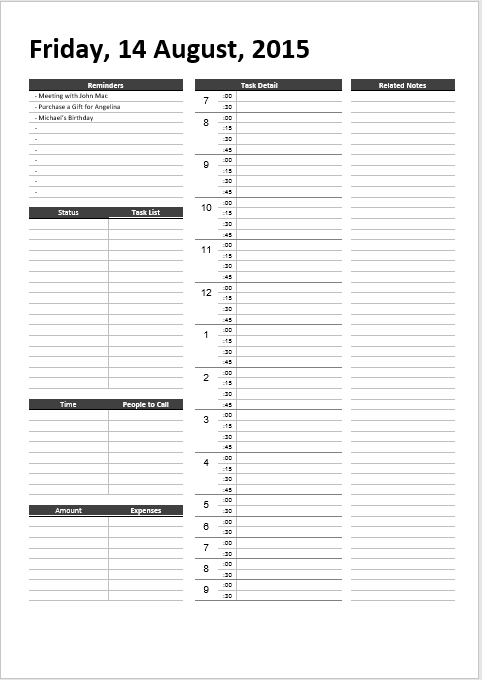
Dated sample with appointments, calls, ranked actions, expenses, and contacts.

Download template 14 (.docx in ZIP)
15. Seven-day time grid
The file is numbered 16 by the site; it shows hourly rows across the full week.

Download template 15 (.docx in ZIP)
Daily planner questions
Should I list tasks or assign every task a time?
Use time slots for fixed commitments and work that benefits from a protected block. Keep smaller, flexible items on a short task list. A day can change quickly, so the planner should help you make the next decision rather than become a rigid prediction. If you repeatedly skip a task, consider whether it is too large, unclear, or no longer important.
Can I use a weekly page as a daily task planner?
Yes, if the weekly view gives you enough writing space. It helps with recurring commitments and prevents you from placing too much work on one day. For detailed calls, notes, or a long checklist, copy today’s portion onto a separate daily sheet. Templates 9, 10, 12, and 15 are particularly useful for viewing several days together.
How much unfinished work should I move to tomorrow?
Carry forward only work that still matters, then place it alongside tomorrow’s fixed commitments and priorities. If an item has moved several times, define a smaller first step or put it on a longer-term list with an appropriate review date. Copying everything without reconsidering it makes the next day feel full before it begins.
Pick one promising preview and try it for a few days. Notice whether you need more room for appointments, priorities, or notes, then switch formats if necessary. The best daily task planner is one you can fill in quickly, read at a glance, and revise when the day changes.